


Stack
Ketchapp
I keep coming back to Stack because it turns one simple action into a surprisingly tense arcade challenge. The idea is easy to understand: place each moving block on top of the previous one and keep building upward. In practice, every tap asks for a little more attention than the last. A slightly late touch can leave an uneven platform, and that small mistake changes the next move.
That simplicity is the main reason I find it so easy to recommend for short breaks. I can play while waiting for a coffee, between tasks, or when I want something that does not require a long explanation. It is a free game from Ketchapp, aimed at Everyone, and it fits naturally into the quick-session style of mobile arcade games. At the same time, its minimal design should not be mistaken for unlimited variety. The appeal depends heavily on whether you enjoy repeating a precise action and trying to improve your own consistency.
Why the first few attempts can feel harder than expected
The opening is accessible, but the timing is less forgiving than the clean visual style suggests. The block moves across the screen, and I have to tap when it lines up with the structure below. A good placement leaves a useful surface for the next block. A poor placement removes part of that surface, making later taps more demanding. The game therefore creates its difficulty gradually rather than through complicated rules.
One of the first things I noticed is that watching the entire moving block can be less helpful than choosing a fixed reference point. I usually focus on the edge nearest the previous layer and tap when that edge reaches a familiar position. This reduces the temptation to chase the block with my eyes. It is a small adjustment, but it makes the rhythm feel more deliberate.
Another common stumbling point is tapping too quickly after a mistake. Once a layer is narrow, I may feel pressure to respond immediately, yet rushing usually produces another poor placement. I get better results by accepting the reduced space, watching one complete movement, and then committing. That pause costs almost nothing in a short arcade round and often saves the attempt.
Related News

Why WhatsApp Messenger Still Makes Everyday Communication Feel Easy

Jurassic World: The Game Is the Better Dino Tycoon for Strategic Players

Threads in Real Life: Who Should Join, Lurk, or Leave

How SHEIN Turned Shopping Into an Endless Content Feed

How to Make Fortnite Feel Smarter on Mobile

Should You Switch to Microsoft Outlook on Mobile?
The visual presentation also deserves attention. The game uses a clean, uncluttered look, so the moving shape is easy to identify. That helps during normal play, but it can make a busy environment more distracting because there are few visual elements competing with the block. I prefer playing with the screen brightness comfortable and notifications out of sight. The game is simple enough to start instantly, but precision still benefits from a calm setting.
What the core loop does well
The strongest part of Stack is the feedback between one decision and the next. I am not simply tapping a button to earn points; I am shaping the space available for future taps. A centered placement gives me room and confidence. An edge placement creates a problem that I must manage. That relationship makes even a short run feel like a test of control rather than pure luck.
I also like that the rules can be understood without a tutorial-heavy introduction. Someone unfamiliar with arcade games can watch one movement and understand the goal. This makes it suitable for sharing with a friend or handing to a younger player, especially since the content rating is Everyone. The challenge is still real, but the concept does not depend on reading instructions or learning a complicated control scheme.
Gallery
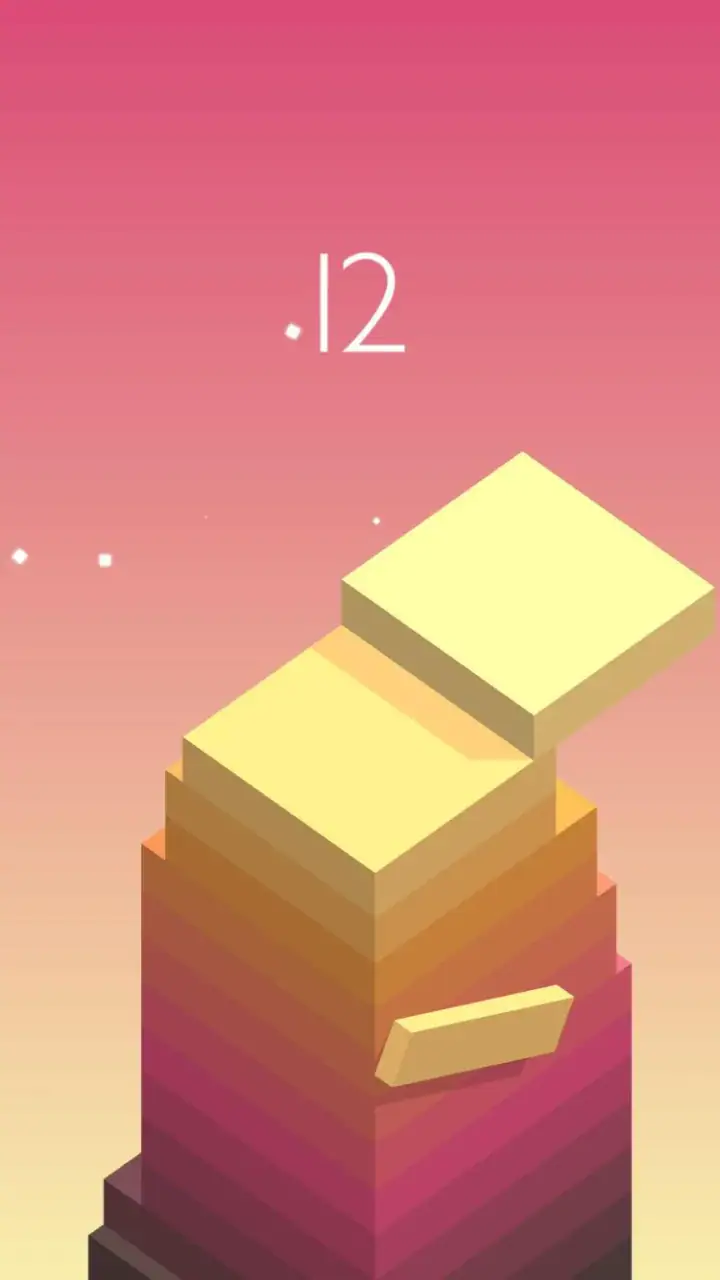
The trade-off is repetition. If you want a campaign, characters, exploration, or a changing set of objectives, this is not the right kind of game. Its satisfaction comes from refining timing within the same basic interaction. I would choose it over a more elaborate arcade title when I have only a minute, but I would choose a larger game when I want progression that feels broader than improving a single skill.
Checking the basics before blaming the game
Stack is free to install, although it includes optional in-app purchases priced from $0.99 to $19.99 per item. For someone deciding whether to try it, that means the initial barrier is low, but it is still sensible to review purchase controls on the device if children use the phone or tablet. I would not treat the presence of optional purchases as a reason to avoid the game, but I would make sure accidental spending is not possible before passing it to someone else.
The game was released on February 17, 2016, and the current version is 3.71. It requires Android 7.0 or later. That requirement is useful to check before troubleshooting installation: if the device runs an older Android release, reinstalling or clearing storage will not solve a compatibility problem. On a supported device, I would first confirm that the operating system is updated enough, that there is room for the installation, and that the app store is signed into the intended account.
These checks sound ordinary, but they prevent a lot of wasted effort. If the installation stops before the game opens, I look at the device version and available storage before assuming the application itself is broken. If it installs but does not appear to update, I check whether the store is processing another download. A stable connection also matters during installation or updates, even though the actual appeal of a quick arcade game is that a short session should feel uncomplicated.
I would also begin with a fresh launch rather than immediately changing several device settings. Open the game, wait for the first screen to settle, and try a short round. If touch input feels delayed everywhere else on the device, the issue is probably broader than Stack. If only this game feels unusual, closing it fully and reopening it is a sensible first step before doing anything more disruptive.
Recovering a disrupted session without losing your rhythm
Short games are especially vulnerable to interruptions because a single round can be over before I have time to recover from a notification or accidental gesture. When that happens, I avoid judging the next attempt immediately. I give myself one round to reacquaint myself with the movement speed and screen position. The first tap after an interruption often feels wrong simply because my attention has shifted.
My preferred recovery routine is simple. I close other demanding apps, return to Stack, and start with a deliberately conservative placement. I do not try to beat my previous result on the first recovered attempt. Instead, I rebuild a stable base and pay attention to whether the touch response feels consistent. This separates a temporary loss of concentration from a genuine device problem.
If the game freezes or fails to respond, I would start with the least invasive steps: leave the app, reopen it, and restart the device if the behavior continues. I would avoid repeatedly tapping the screen while it is unresponsive, since that can make it harder to tell whether the input is being registered late or not at all. If the issue appears after an update, checking the app store for another pending update and confirming that the device still meets the Android requirement are reasonable next checks.
Clearing app data or reinstalling should be treated as a later step, not the first one. Those actions can remove local progress or settings, depending on how the app handles them, so I would only consider them after simpler recovery attempts and only if I am comfortable starting over. For a game built around short runs, restarting may not be devastating, but it is still frustrating if a good personal record disappears.
When the phone, environment, or expectations are the real issue
Not every missed placement indicates a fault. Touch accuracy can feel different when the screen is wet, when a thick case changes how the finger lands, or when the device is under heavy load. I have found that a player can mistake inconsistent physical contact for bad timing, especially because Stack gives immediate consequences for a small input error. Cleaning the screen and trying a few taps in another app can help distinguish these situations.
Performance can also be affected by the wider device environment. If several apps are active, the phone is unusually warm, or the system is busy with updates, a game that normally feels responsive may seem less predictable. I would test it again after closing unnecessary apps and letting the device return to a normal temperature. If other touch-based apps show the same delay, Stack is unlikely to be the only cause.
There is another kind of mismatch that is not technical: expecting the game to provide constant novelty. The store summary describes smoother gameplay and a fresh new look, but the lasting appeal for me still comes from the stacking challenge itself. I would not install it expecting a story, a large collection of modes, or a long-form progression system. It works best as a focused arcade exercise that I can revisit whenever I want to sharpen timing.
Compared with endless runners, Stack removes most of the movement decisions and concentrates on alignment. Compared with puzzle games, it asks for less planning and more immediate reaction. Compared with rhythm games, it has a beat-like flow without requiring music-based timing. Those differences matter when choosing an alternative. If you want to think several moves ahead, a puzzle game may suit you better. If you want constant motion and changing obstacles, an endless runner will probably offer more variety. Stack is the better fit when a single precise gesture is enough to hold your attention.
Small techniques that make repeated play more useful
I recommend treating each run as practice for one specific habit instead of only chasing a higher score. For example, I might focus on tapping from the same hand position, keeping my eyes on one edge, or waiting for a complete movement before deciding. This gives the session a clear purpose and makes improvement easier to notice. It also reduces the frustration of feeling that every failure was random.
A second useful habit is recognizing when the structure has become too narrow to play aggressively. After an imperfect placement, I stop trying to recover the original pace. I let the next block complete its movement and choose the safest alignment I can see. This is a practical trade-off: I may lose the chance to build quickly, but I preserve control and often extend the run.
I also find that changing the physical setup can reveal whether I am relying too much on visual speed. Playing with the device held steadily in both hands produces a different feeling from playing one-handed while walking. For serious attempts, I use a stable grip and avoid tapping while moving. For casual attempts, I accept that the environment is part of the challenge. Knowing which kind of session I am having keeps me from blaming the game for a result caused by divided attention.
Finally, I would not use a long session to force improvement. The game’s short format makes it easy to play “one more time,” but tired reactions can turn practice into repetition without learning. A brief pause after several failed attempts often helps more than continuing immediately. When I return, I can usually see the movement more clearly and make a calmer first placement.
Who should install it, and who should skip it
Stack is a strong choice for anyone who likes minimalist arcade games, quick retries, and skill improvement that comes from timing rather than complex controls. It is especially convenient for people who want something that can be understood in seconds and played in short bursts. The Everyone rating also makes the basic concept approachable for a broad audience, while the precision gives older players enough challenge to keep returning.
I would be more cautious recommending it to someone who dislikes repeated attempts or becomes annoyed by small mistakes. The game does not disguise its central loop, and there is no reason to expect the experience to transform into a different genre after a few rounds. Players who need a substantial narrative, social competition, exploration, or a wide range of objectives will probably find more satisfaction elsewhere.
Its popularity suggests that the format has reached a large audience: the game has a 4.0 average from around 445 thousand ratings and more than 50 million installs. Those figures explain why it is easy to encounter, but they do not guarantee that its narrow focus will suit every player. I would use them as evidence that the core idea works for many people, not as a substitute for deciding whether precise, repetitive arcade play is enjoyable for you.
My practical verdict after using it
I think Stack succeeds because it makes alignment feel meaningful. Each tap is small, but the result changes the next opportunity, so the game creates tension without complicated rules. The clean presentation helps me start quickly, and the short rounds fit naturally into ordinary downtime. Ketchapp keeps the experience centered on the act of stacking rather than burying it under menus or systems.
The limitations are just as clear. Repetition may wear thin, interruptions can ruin the rhythm of a run, and a device with inconsistent touch response can make the challenge feel unfair. Optional purchases also mean I would check spending protections before letting a child play freely. None of these points cancels the appeal, but they define the kind of player who will enjoy it most.
For me, Stack is worth trying when I want a free arcade game that starts instantly and rewards patience, visual focus, and controlled taps. I would install it on a supported Android device, test a few rounds in a calm setting, and judge it by whether I enjoy improving my placement rather than by how much content it offers. If that focused loop feels satisfying, it can become a dependable little time-filler. If I am looking for variety or a deeper progression system, I would choose another arcade option instead.
FAQs for Stack
What is Stack and what does it do?
Stack is a productivity app designed to help users manage their tasks and projects efficiently. It offers features like task scheduling, reminders, and collaboration tools. The app is ideal for individuals and teams looking to streamline their workflow, prioritize tasks, and enhance productivity through seamless organization.
Is Stack free to use, or does it require a subscription?
Stack offers a free version with essential features suitable for basic task management. For advanced features such as team collaboration, enhanced storage, and priority support, a subscription is required. Various plans are available, catering to personal use and larger teams, each priced competitively.
Can Stack be used offline, and will my data sync once online?
Yes, Stack can be used offline, allowing users to access and update their tasks without an internet connection. Once the device is back online, Stack automatically syncs the data across all devices linked to the user's account, ensuring seamless continuity and up-to-date information.
How secure is my data on Stack?
Stack prioritizes user data security by implementing robust encryption protocols. This ensures that all personal and project data is protected from unauthorized access. Additionally, Stack complies with international data protection regulations, giving users peace of mind regarding their information's safety.
Is Stack compatible with both Android and iOS devices?
Yes, Stack is available on both Android and iOS platforms, ensuring compatibility across a wide range of devices. The app is optimized for smartphones and tablets, providing a consistent user experience, whether you're managing tasks on the go or from the comfort of your desktop.
Pros
- User-friendly interface for easy navigation.
- Wide range of features for productivity.
- Cross-platform compatibility.
- Offline access to notes and documents.
- Regular updates with new features.
Cons
- Limited free storage space.
- Premium features require subscription.
- Occasional sync issues reported.
- No integration with certain third-party apps.
- Interface can be overwhelming for new users.


